Your first month is free.Add code at checkout.

IT and Security

Acceptable internet use: online training course

What is expected when you use the internet, email and devices at work, how to stay safe online, and how to avoid the mistakes that cause most security incidents.

Illustration for the Acceptable internet use course
Time
20 minutes
Sections
5
Questions
5, 4 to pass
Certificate
PDF, on passing

Who it is for

Everyone with a work email address, laptop or phone. A sensible course to make mandatory for the whole team and for new starters in their first week.

Why it matters

Most security incidents start with one person and one email. This course makes your acceptable use policy something people understand, and shows them the attack they will actually meet.

What it covers

5 sections, about 20 minutes.

Each section makes one point and can be read in a few minutes. Progress is saved after every one.

By the end, people will be able to

  • Explain what is expected when using the internet at work
  • Recognise phishing and other common attacks
  • Handle passwords, devices and data safely
  • Know what to do when something goes wrong

Law and guidance it draws on

  • UK GDPR and the Data Protection Act 2018
  • Computer Misuse Act 1990
  • Your own acceptable use and IT security policy
  1. 1

    Why there are rules at all

    Why an acceptable use policy exists: security, the law and the organisation’s reputation.

  2. 2

    What is expected of you

    What is usually fine, what is never acceptable, and where personal use fits.

    Includes a side-by-side checklist
  3. 3

    Phishing: the attack you will actually meet

    How phishing works, the signs that give it away, and the fake “urgent payment” request.

    Includes a scenario
  4. 4

    Passwords, devices and data

    Strong passwords and multi-factor sign-in, locking devices, public wi-fi and handling personal data.

    Includes a step-by-step guide
  5. 5

    Monitoring and the consequences

    What employers may lawfully monitor, what happens after a breach, and why reporting a mistake quickly matters most.

    Includes myths and facts
  6. Check your knowledge

    5 questions on what has just been read. 4 correct answers complete the course and produce the certificate. For example: “An email asks you to pay a supplier urgently using new bank details. What is the safest response?”

From the course

What would you do?

Every course includes a scenario like this one. It is not scored: choosing an answer explains why it is right or wrong, which is how people remember it.

You receive an email that appears to be from your managing director: “I am in a meeting and need you to pay this supplier today. New bank details attached. Do not call, just get it done.” What do you do?

  1. APay it. It is from the MD and marked urgent
  2. BReply to the email asking if it is genuine
  3. CCheck by phoning the MD or the supplier on a number you already know, and report the email
Show the answer

C. Right. Always confirm payment or bank-detail changes using contact details you already hold, never those in the message.

In LeaveWise

Assign it, and know when it is done.

This course is one of 9 in Learn, part of every LeaveWise plan. Here is what happens once you assign it.

How Learn works

Give it to the right people.

Assign Acceptable internet use to everyone, a department, a location or named people, with a due date if you want one. Make it mandatory and new starters are given it automatically. Each person gets an email with a link straight to the course, and it appears on their Dashboard.

  • Reminders a week before, the day before and while overdue
  • A Monday list of overdue training for managers
  • Optional renewal, for example every year
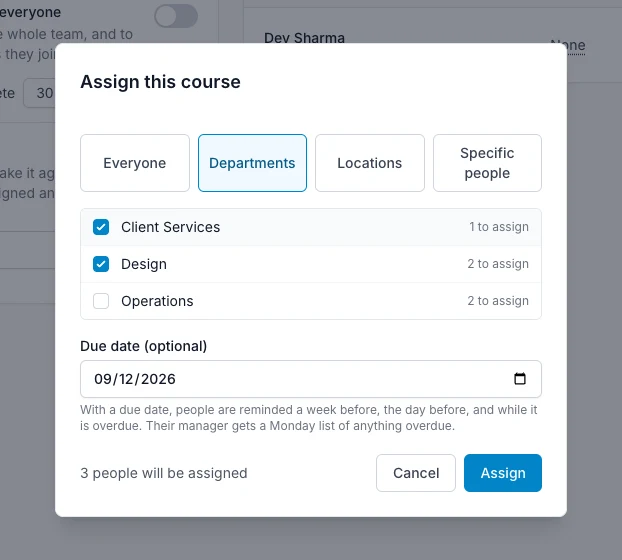
Assign this course dialog with departments selected and a due date

See who has completed it.

When someone passes, their manager is emailed and the training record shows a tick with the date. You can see at a glance who has finished, who is part-way and who is overdue, and download the list or any certificate as evidence.

  • Completion email to the person’s manager
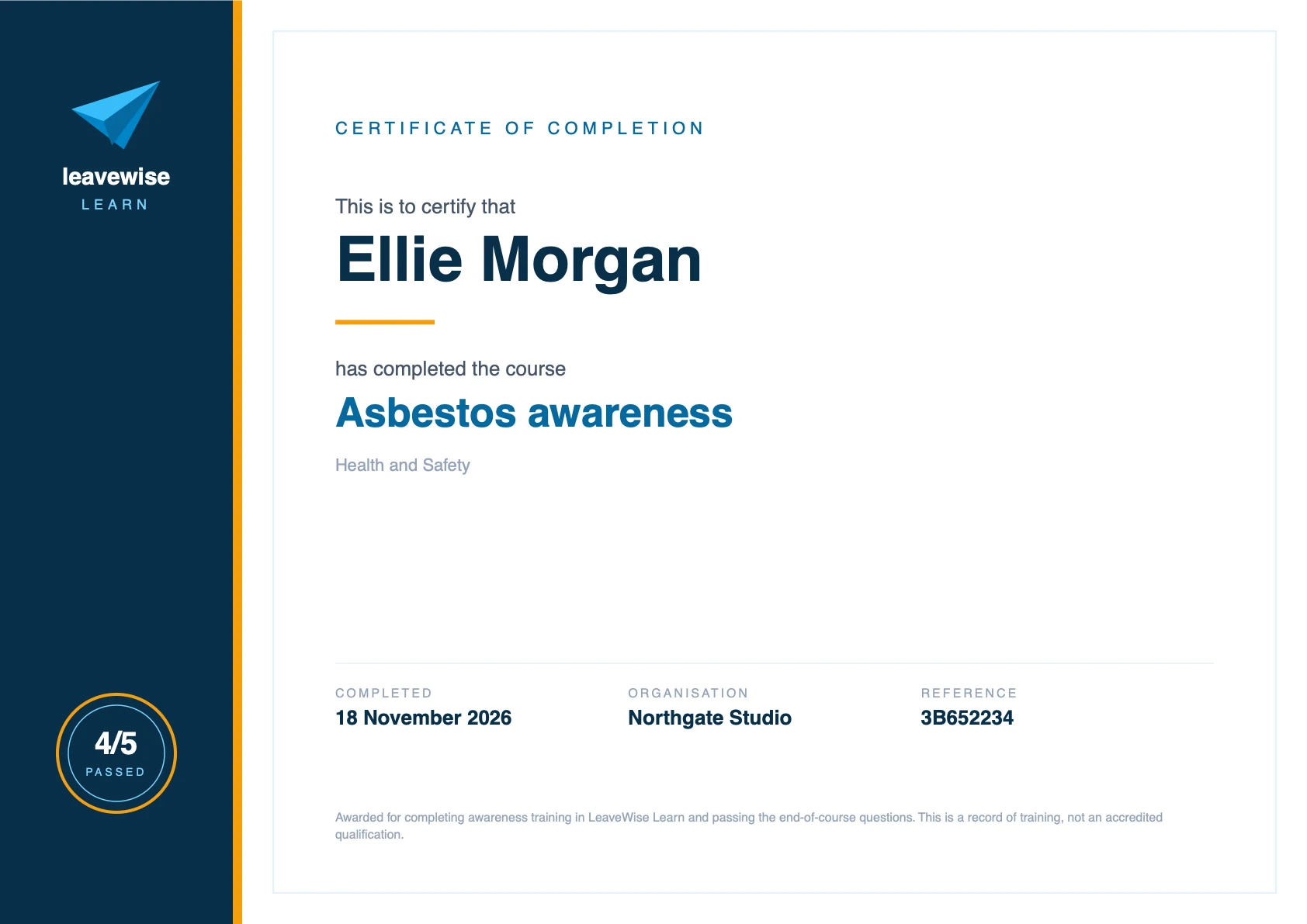
  • PDF certificate with name, date, score and reference
  • Training record you can filter and download
LeaveWise Learn certificate of completion showing the person’s name, course, score, date, organisation and reference
FAQ

Questions about
this course

Something else on your mind?
Talk to us

Are the training courses included in the price?

Yes. Learn and every course in it are part of every plan, from £4.99 a month for up to 5 users. There is no charge per course or per learner, and new courses are added to your account as they are released.

How long does a course take?

Between 15 and 30 minutes. Each is a few illustrated sections followed by five questions, and four correct answers are needed to pass. People can stop part-way and carry on later, and try the questions again if they do not pass first time.

Do staff get a certificate?

Yes. Passing the questions at the end of a course produces a PDF certificate with the person’s name, the course, the date, the score and your organisation’s name. They can download it at any time, and so can their manager and team admins.

Can I see who has completed their training?

Yes. The training record shows every person against every course: completed with the date, in progress, not started or overdue. You can filter it by department or location, download it as a spreadsheet, and download any certificate from it. Department managers see the same record for their own departments.

Can I make a course mandatory for new starters?

Yes. Switch a course to “Mandatory for everyone” and it is assigned to the whole team with a due date, and to every new starter automatically when they join. You choose how many days people have to complete it.

Are the courses accredited?

No. They are awareness training written for UK workplaces: general guidance that helps people understand a subject and what is expected of them. The certificate is a record that a named person completed the course and passed the questions on a given date. Where the law requires formal, practical or accredited training, the courses support it but do not replace it.

Get started today

Give your team Acceptable internet use, and keep the record.

Every course, certificate and reminder is included in every plan, from £4.99 a month for five people.

Get started with LeaveWise See pricing Monthly billing. No contract. Cancel any time.