LeaveWise
Department managers keep approval decisions close to the people who understand the team’s day-to-day coverage. LeaveWise uses the manager assigned to a department to route that department’s requests.
This is separate from the reporting-line org chart. A “reports to” relationship describes the organisation’s structure; the department’s manager setting drives approval routing.
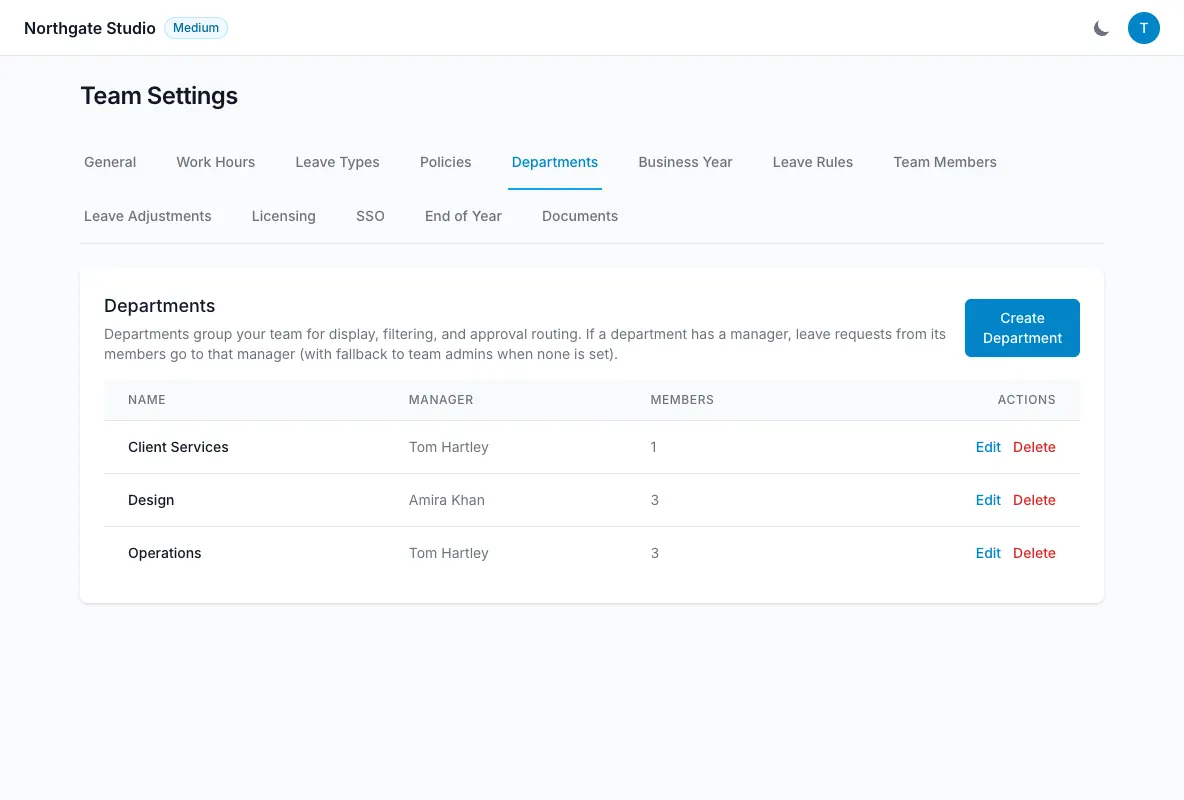
Assign a department manager
As an admin, review the team’s departments and choose the manager for the relevant department. Make sure the employees who should use that approval route are assigned to that department.
Check the manager’s identity carefully, particularly where people have similar names or recently changed roles. An outdated department assignment can explain why an expected request is not in a manager’s queue.
Understand the routing rule
When a department has a manager, its requests go to that manager. When no manager is set, requests go to the team admins.
Managers see their own department’s approval queue. This helps them focus on the people whose availability they manage rather than exposing every department’s requests.
Self-approval is prevented. Assigning someone as a manager does not allow them to approve their own holiday.
If requests tend to wait, turn on the approver reminder in Leave rules → Reminders. Each morning it emails approvers the requests that have waited more than a day, and tells the team admins about any that have waited 3 days for a department manager. See Reminder emails.
Review the information available
For each request, the approver sees the days, dates, note and any supporting document. Restricted-date warnings and department coverage are available too.
The coverage note helps the manager see how many colleagues are already away. It is useful context, but the manager should also consider the team’s actual responsibilities and written leave policy before deciding.
Approval or rejection sends email notifications. Employees can cancel pending or approved leave if their plans change.
Keep assignments up to date
Review department managers when someone changes role or leaves. Also check the optional manager reminder: when enabled, it tells the relevant manager that someone is off from tomorrow.
Reminder switches are separate from approval routing and are off by default. Assigning a manager does not require the team to enable every reminder.
If your organisation needs an approval arrangement beyond the documented department-manager or admin route, contact support to discuss the requirement rather than assuming a multi-stage approval workflow exists.