LeaveWise
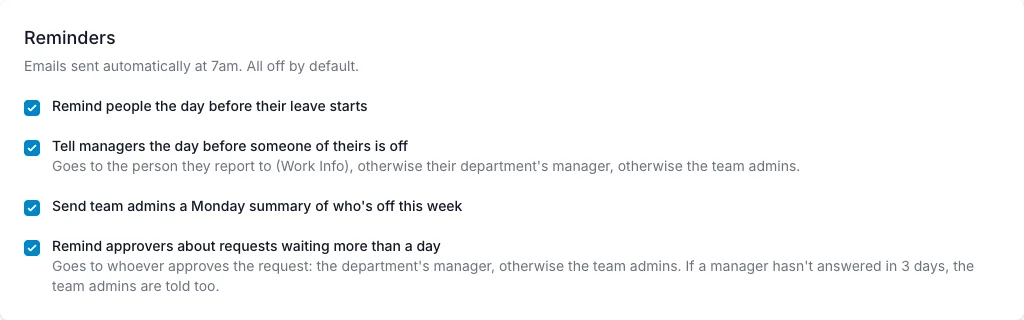
Reminder emails help the team prepare for upcoming time off without someone maintaining a weekly message by hand. LeaveWise has six team-level switches, all under Team Settings → Leave rules → Reminders.
The four leave reminders are off by default. One-to-one reminders and training emails are on by default, because they only send anything once you start using those features. Turn on the ones that help your team rather than assuming every person needs every notification.
Remind the person taking leave
The employee reminder says that their leave starts tomorrow. It is a useful prompt to finish a handover or check anything that needs attention before they are away.
This reminder is separate from the email sent when a leave request is approved or rejected. One communicates a decision; the other looks ahead to the start of the absence.
An employee should still check their booking details when making the request instead of relying on the reminder to catch a wrong date.
Remind the manager
The manager reminder says that a person is off from tomorrow. It goes to the person they report to (set on their Work Info), otherwise their department’s manager, otherwise the team admins, so keep reporting lines and department managers up to date.
The email can prompt a coverage check or handover conversation. It does not change the booking or make a fresh approval decision.
If a manager is missing an expected reminder, review the team switch and department setup before assuming the employee’s leave was not recorded.
Send the Monday digest
The Monday digest tells admins who is off that week. It gives the people managing the team a useful starting point without having to assemble the list manually.
The Who’s Out grid and Team Calendar remain available for checking specific dates or looking beyond the current week. A digest is a summary, not a replacement for the live records.
These scheduled reminder emails run at 7 am. Do not infer a guaranteed delivery minute or a particular timezone beyond the product’s documented configuration.
Remind approvers about waiting requests
The approver reminder emails each approver the leave requests waiting on them. A request is included once it has been waiting for more than a day, and only while its dates have not passed, so old requests are never chased.
It goes to whoever approves the request: the department’s manager, otherwise the team admins. If a request has waited 3 days for a department manager, the team admins are told too, so nothing stalls while a manager is away.
Each approver gets one email a morning, listing every request with how long it has waited and a link to the Approvals page. If return-to-work prompts are on, any return-to-work notes they still have to record are listed in the same email.
One-to-one reminders
Remind people about one-to-ones is on by default. The manager and the employee each get an email the day before a one-to-one and on the day, and the manager gets one nudge if it is 3 days past its date and not yet completed. If the person is on approved leave that day, the email says so. See One-to-ones.
Training emails
Send emails about training in Learn is on by default. It covers the email when a course is assigned or due for renewal, reminders a week before and the day before a due date and weekly while it is overdue, the email to a person’s manager when they complete a course, and a Monday list of overdue training to managers. A reminder an admin sends by hand from a course page is always sent. See Assign and manage courses.
Review the switches
Open the reminder options in the team’s leave rules and enable the messages you want. Tell the team what you have enabled so the emails are expected.
LeaveWise reminders are email features. Slack and Teams notifications are planned but are not currently available.
If you need help with a missing email, include the reminder type, relevant booking dates and department when contacting support. Do not include passwords, recovery codes or private employee documents.