LeaveWise
Planwise is the task-planning module included in every LeaveWise plan. It is deliberately light: boards, columns, tasks, and enough detail to keep a small team’s work visible without a separate project tool.
Open it from Planwise in the sidebar.
Create a board
Click New board, give it a name and a colour, and choose whether it is private (only you and people you share it with) or shared with the team (everyone in your team can see it; only people with edit rights can change it). You can change this later from the board’s settings.
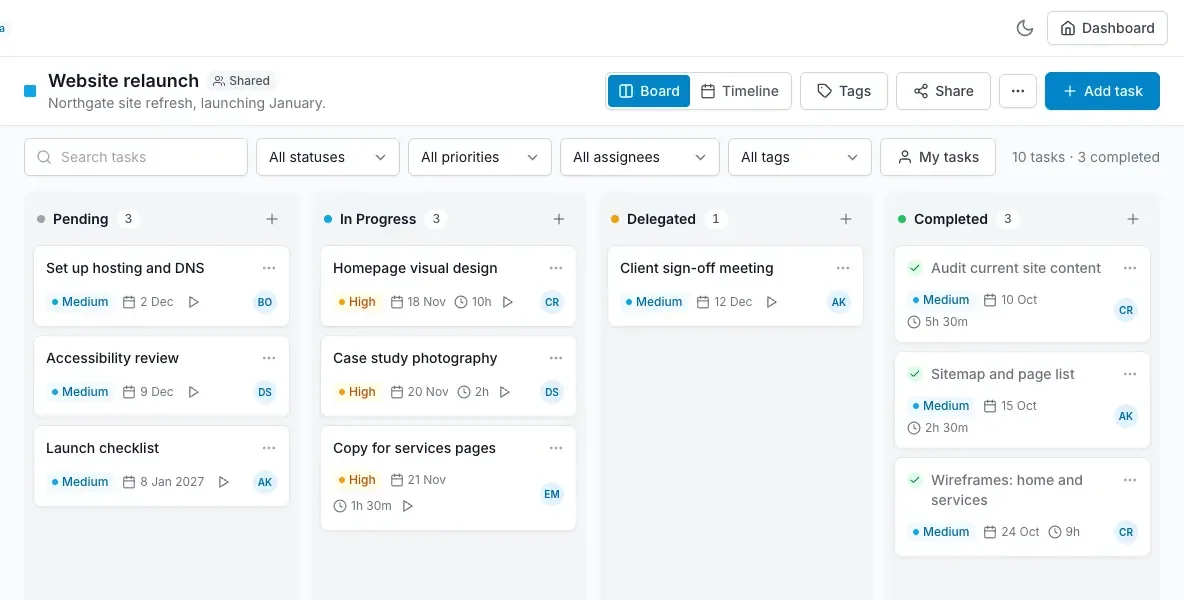
A board has four columns: Pending, In progress, Delegated and Completed. Drag a card between columns to change its status, or set the status inside the task.
Add and edit tasks
Click Add task in a column. A task has a title, description, priority (low, medium, high), a scheduled date and a due date, an estimate in hours, an assignee from your team, a colour, and any number of tags. Overdue tasks are marked on the card.
Open a task to see everything about it on one screen. Changes save as you make them.
Tags
Tags are shared across the team, so “Client”, “Internal” or “Urgent” mean the same thing on every board. Create them from the tag picker inside a task; team admins can rename or delete them from the board menu.
Comments
Every task has a comment thread. Use it for decisions and hand-over notes so the context stays with the work rather than in email. You can edit or delete your own comments; the board owner can delete any.
Dependencies
In a task, use Blocked by to link it to the task that must finish first. The blocking task shows which tasks are waiting on it. Planwise prevents a task from depending on itself or on something that already depends on it.
Logging time
Start the timer on a task while you work, or add time by hand. Time logged is kept against the estimate and shown on the card; the Reports page sums it per board and per person. Time entries appear in the task’s activity as system comments.
Who can do what
The board owner and anyone given admin access can change the board, share it and delete it. Edit access lets you add and change tasks. View access is read-only. Team admins can see every shared board; private boards are visible to them in read-only form for oversight. See sharing and archive.