LeaveWise
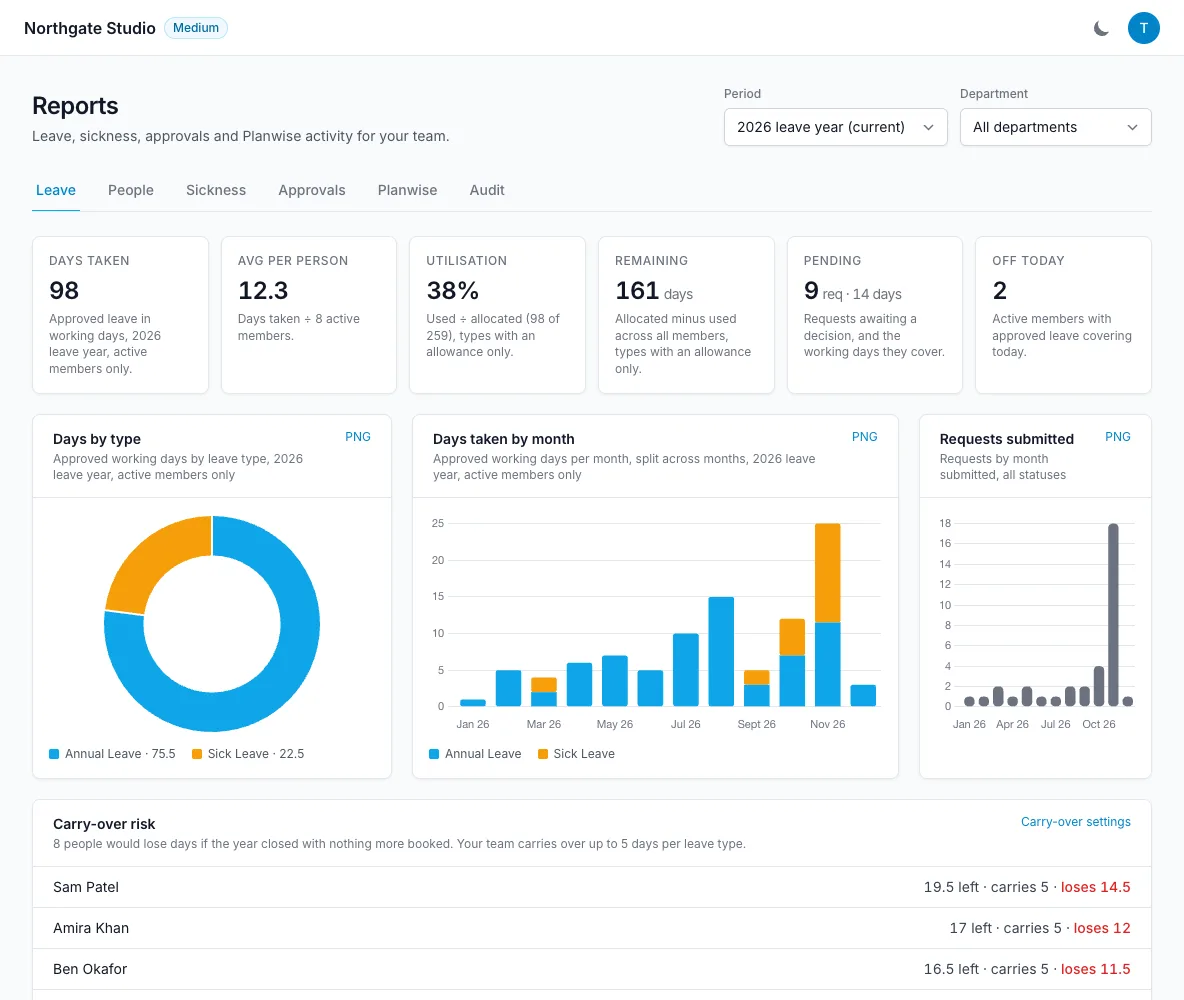
Reports (in the sidebar, team admins only) turns the team’s leave into numbers you can act on. Every figure uses the same rules as the balances people see (each person’s working pattern, bank holidays, pro-rata and adjustments), so the report and the dashboard agree.
Choose the period and department
At the top of every tab, pick the period: the current leave year (default), the previous or next one, the last 12 months, or a custom date range. Filter by department to look at one team. Leave belonging to former members is shown separately so it never distorts current headcount.
Leave
The overview tiles show days taken, average per person, how much of the allowance is used, days remaining, requests pending and who is off today. Below them: leave by type and by month, the most popular days of the week and dates, and the busiest working days for cover.
Carry-over risk appears in the last quarter of the current leave year. It lists everyone who would lose days if the year closed with nothing more booked, showing what they have left, what will carry over and what will be lost. It uses your team’s own carry-over limit, per leave type, exactly as closing the year does. If your team does not carry days over, everything left counts as lost. Sick and unpaid leave are not counted.
Carried-over days about to lapse lists days brought forward from last year that will expire at their use-by date unless more leave is booked before it. See carry-over.
People
One row per person: allowance, used, pending and remaining, how much of the allowance is used, sick days, last sign-in and whether two-factor is turned on. Expand a row for the breakdown by leave type.
The Health column flags people who have used nearly everything, have none left, or are likely to lose days at year close (with the number of days, on the same rule as the carry-over card).
Sickness
Choose which leave types count as sickness, then see episodes, days, people affected and lost time; sickness by day of the week; and a table by person with a Bradford-style score that highlights frequent short absences.
The Return to work section shows how return-to-work notes are going for sick leave:
- Notes recorded: notes recorded or marked not needed, out of the absences that needed one.
- Outstanding: people back at work, within the 14 days, with no note yet.
- Missed: the 14 days passed with no note. A note can still be recorded from their profile.
- Long absences without a fit note: more than 7 days off sick in a row, back at work, with no note saying a fit note was received.
A table lists each absence with the day they were back, the note’s status, whether they were fit to return and the fit note. The note text itself stays on the person’s profile. Absences from before return-to-work notes existed are shown as “Before notes” and not counted. See return-to-work notes.
Approvals
How long requests wait for a decision, approvals and rejections by approver, and leave booked on behalf of people.
Pending requests ageing lists every request still waiting, longest first, with the leave type, how long it has waited and who it is waiting on: the department manager, or the team admins. Requests that have waited 3 days for a department manager are marked Admins told, and requests whose dates have already passed are marked Dates passed, so you can approve or reject them to clear them. If approver reminders are off, the card says so; see reminder emails.
Planwise
Boards, tasks completed and time logged per person and per board. (The detailed deletion audit is inside Planwise, under Audit in its sidebar.)
Audit
The audit log of changes across the team.
Payroll export
At the bottom of the Leave tab, Payroll export produces a CSV for any date range: one row per active person with holiday, sick, unpaid and other days taken, department and policy names. Leave that straddles the range is clipped to it, and each person’s working pattern and the team’s bank-holiday setting are applied. See payroll export.
Exporting leave history
Admins can also download the team’s full leave history as CSV from Leave History, with working days, approver and who booked each entry.