LeaveWise
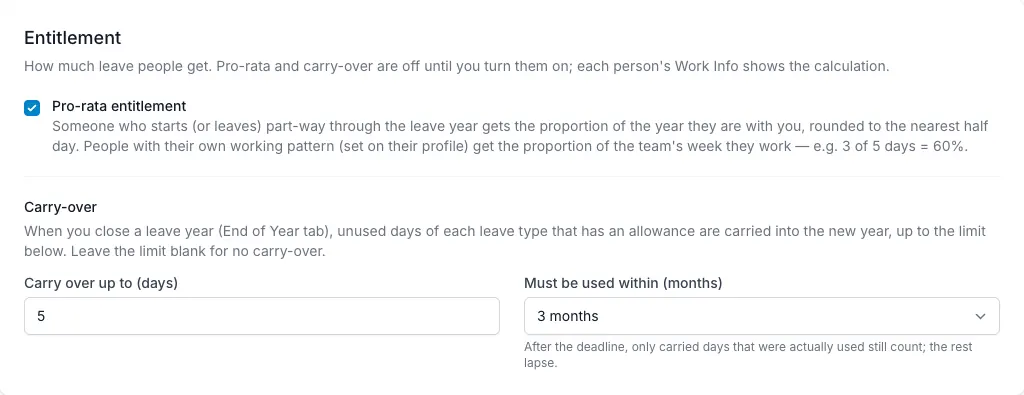
Carry-over transfers eligible unused days into a new leave year. In LeaveWise it is optional, can be capped and can have an expiry after a chosen number of months.
The transfer is created when an admin closes the previous leave year. It is not simply triggered by the calendar reaching the first day of the next year.
Agree the rule first
Check your organisation’s written policy and any obligations that apply to the circumstances. A product setting is not a substitute for deciding the correct employment policy.
The cap controls the maximum unused days that can carry. An optional expiry controls how long the carried allowance remains available under the configured rule.
Explain the rule to employees in plain language so a new-year balance does not come as a surprise.
Configure carry-over
In the team’s leave settings, enable carry-over and set the cap. If the policy includes an expiry, configure the number of months.
Review the leave-year start alongside the carry-over rule. Expiry should make sense in the context of your team’s year rather than being interpreted as an unrelated calendar deadline.
Check the settings before closing the old year, because closing creates the carry-over records.
Close and review the previous year
An admin can close the year after it has ended. Closing produces a CSV archive, records closing balances, clears the year’s adjustments from the active calculation and creates carry-over.
Review leave records and outstanding balance corrections before taking that action. The closing position should represent the figures you intend to retain.
After closing, inspect the new year’s balance for a representative person and verify the carried amount against the unused days and cap.
Understand expiry
After the configured expiry, only carried days actually used still count. Unused carried allowance is no longer available in the same way.
Keep ordinary entitlement, TOIL and carry-over conceptually separate when explaining the balance. A change to carried days does not mean every part of the annual allowance has expired.
If the figures do not match expectations, review the old year’s closing balance, cap, expiry and relevant usage. Avoid manually adding the same unused allowance again, as that can duplicate the intended transfer.
See who is at risk
In the last quarter of the leave year, Reports → Leave → Carry-over risk lists everyone who would lose days at year close on your team’s rule, with what they have left, what will carry over and what will be lost. Carried-over days about to lapse shows carried days that will expire unused unless more leave is booked before the use-by date. See Reports.