LeaveWise
A short conversation when someone comes back from sickness is good practice: it checks they are well enough to be back, agrees anything that would help, and leaves a record. LeaveWise prompts the right person to have that conversation and keeps the note with the person’s record.
Return-to-work prompts are on for every team by default. They appear in the app only, never as an email on their own.
When a note is due
A note is due after approved leave of a sickness type ends. A sickness type is any leave type with “sick”, “ill” or “absence” in its name, the same rule the Sickness report uses by default. Rename a leave type if it is counted the wrong way.
The prompt appears on the person’s first working day back. That follows their own working pattern and skips bank holidays, so sickness that ends on a Friday is due on the Monday. It stays for 14 days, then drops off so the list never fills with old absences.
Who is asked
The person’s department manager is asked. If they have no department manager, or they manage their own department, the team admins are asked instead. This is the same rule that decides who approves their leave, so the person asked is always someone who can act on it.
Nobody is asked to write a note about themselves.
Record a note
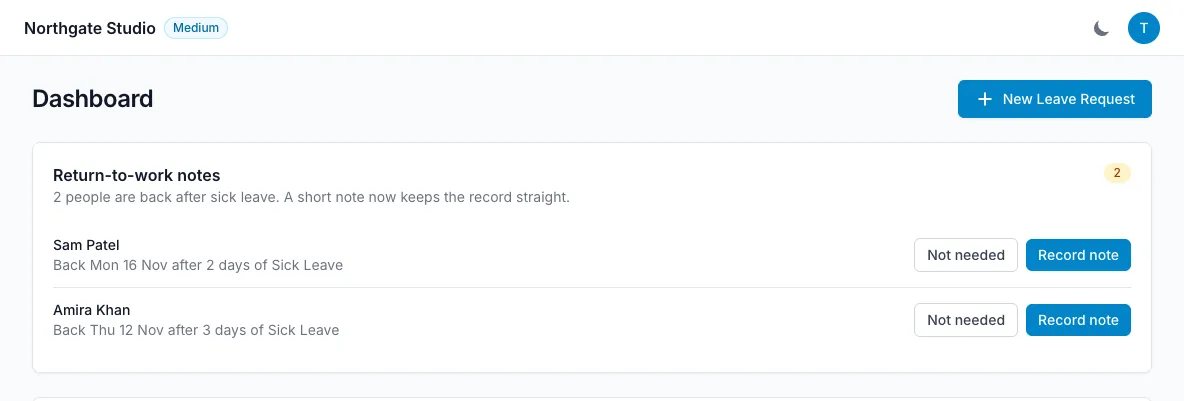
Due notes appear in a Return-to-work notes card at the top of the Dashboard. Select Record note and answer three things:
- Fit to return? Yes, Yes with adjustments, or Not yet.
- Fit note from a doctor. Received, Not received or Not needed. A fit note is normally needed when someone is off sick for more than 7 days in a row; for shorter absences people can self-certify.
- Notes. How they are feeling and anything agreed, such as a phased return, adjusted duties, support or a follow-up.
Select Save note. The card updates straight away.
If a conversation is not needed, for example after a half day off with a migraine, select Not needed. That is recorded too, so the prompt does not come back.
Where notes are kept
Every note is kept on the person’s profile, on the Return to work tab. Their department manager and the team admins can read and edit it there, and due notes can be recorded from the same tab.
The person can read their own notes, read-only, on their profile. Write each note on the basis that they will see it.
Recording, editing or marking a note as not needed is listed in Reports → Audit under HR.
See how notes are going
Reports → Sickness → Return to work shows notes recorded, notes still outstanding, any missed, and long absences of more than 7 days with no fit note received. A table lists each absence with its note status, linking to the person’s profile. See Reports.
Turn prompts off
Go to Team Settings → Leave rules → Return to work and untick Prompt for a return-to-work note after sick leave, then save. Notes already recorded stay on people’s profiles.
If you also turn on reminders to approvers (Leave rules → Reminders), the morning email lists any return-to-work notes still to record alongside waiting leave requests. See Reminder emails.