LeaveWise
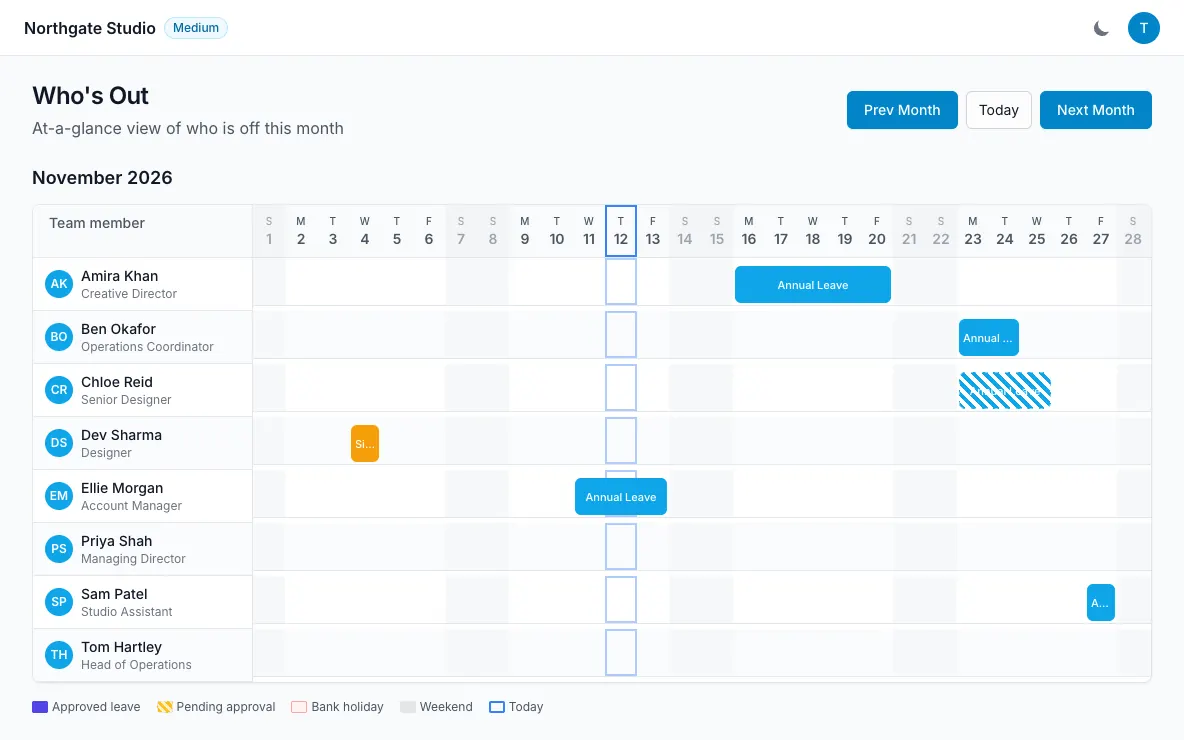
Who’s Out is a monthly grid of the team’s leave. It gives colleagues a shared answer to “who is away?” without asking everyone to maintain separate availability messages.
The grid is useful when choosing holiday dates, planning a handover or checking the shape of an upcoming week. It does not replace the approval decision or the person’s balance breakdown.
Read the month
Open Who’s Out and choose the relevant month. Look across the people and dates to see leave in the context of the wider team.
Leave is colour-coded by type and status. Bank holidays and weekends are marked, helping distinguish absence from days that already sit outside a normal working week.
Pay attention to status as well as colour. A request awaiting a decision and an approved absence do not mean the same thing for planning.
Use the view before requesting leave
Check the dates you have in mind and consider who else will be away. This can make a conversation about cover easier before a request reaches the approver.
The request form also shows colleagues in your department who are already off. The approver sees department coverage information too, such as how many people are absent out of the department total.
Seeing an overlap does not itself decide whether a request is acceptable. That decision belongs to the approver and your organisation’s policy.
Know the privacy boundary
Team visibility means colleagues can see who is away. It does not mean everyone can browse private supporting documents or personal HR records.
Members see their own HR items only where those items have been made visible to them. Approvers receive the information needed for the requests they handle.
If you need to discuss a sensitive reason for absence, use the appropriate private channel rather than treating the shared grid as the place for detailed explanation.
Choose another view when helpful
The Team Calendar provides month, week and list views with filters. A list can be useful for reading dates, while the monthly grid gives a broader picture.
You can also subscribe to your own leave or the team’s approved leave in an external calendar. That subscription is read-only, and the external calendar controls refresh timing.