 LeaveWise
Every person’s profile has a line that reads Entitlement this leave year, on the Work Info tab. This guide explains exactly how that number is reached, so you can tell why two people on the same team have different figures, or why changing someone’s working days did not change theirs.
There are four steps. LeaveWise goes through them in this order for each leave type.
Step 1: which leave types the person gets
A person’s leave types come from one place only. LeaveWise uses the first of these that applies:
- The leave policies assigned to them. If someone is on a policy, they get that policy’s leave types and allowances, and the team’s own Leave Types do not apply to them. A policy that has no leave types in it yet is ignored.
- The team’s Leave Types, set in Team Settings → Leave → Leave Types. This is what everyone without a policy gets.
- Every policy the team has, combined. This only happens when the team has no Leave Types of its own at all, so a team that works entirely from policies still gives everyone something by default.
If someone is on more than one policy and two of them contain a leave type with the same name, the one with more days is used. The allowances are not added together. Someone on a “Standard” policy with 25 days of Annual Leave and a “Long service” policy with 28 gets 28, not 53.
If a number looks wrong, check this step first. Open the person’s Assignments tab to see which policies they are on. A change to the team’s Leave Types does nothing for a person who is on a policy.
Step 2: the full allowance
The days set against the leave type are the full allowance. If Annual Leave is 25 days in the policy or the team’s Leave Types, 25 is the starting point.
Step 3: pro-rata, only when it is switched on
Pro-rata is a team setting, in Team Settings → Leave → Leave Rules, under Entitlement. It is off until you turn it on.
With pro-rata off
Everyone gets the full allowance. Their working days and their start date make no difference to the entitlement.
This catches people out. A colleague who works Monday, Wednesday and Friday on a team with 25 days gets all 25. Because leave is only charged on the days they work, those 25 days stretch much further for them than for a full-time colleague: a full week off costs them 3 days, not 5.
If that is not what your policy says, either turn pro-rata on, or give part-time staff their own leave policy with the allowance you have agreed.
With pro-rata on
Two reductions can apply. The profile shows the working for each.
Working fewer days than the team. This applies to anyone who has their own working pattern with a different number of days from the team’s week. Their allowance is multiplied by their days over the team’s days.
Team works 5 days. Ellie works Monday, Wednesday and Friday. 25 × 3 ÷ 5 = 15 days
Starting or leaving part-way through the leave year. This uses the person’s Start date and Termination date from their Work Info tab. The allowance is multiplied by the working days they are with you, over the working days in the whole leave year. Working days are counted on the person’s own pattern, and bank holidays are left out of both counts when your team does not count them as leave.
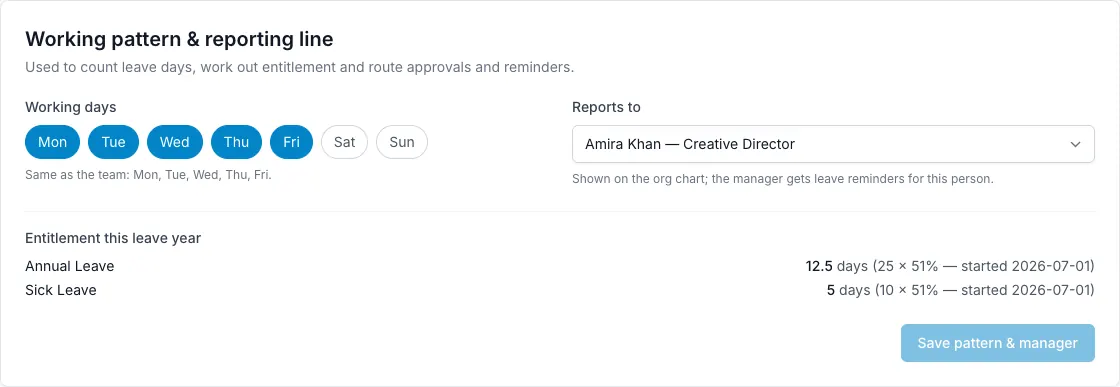
Leave year January to December 2026, Monday to Friday, England and Wales bank holidays not counted. Dev starts on 1 July 2026. There are 253 working days in the year, and 129 from 1 July. 25 × 129 ÷ 253 = 12.75, rounded to 12.5 days
Sam leaves on 31 March 2026. He is there for 63 of the 253 working days. 25 × 63 ÷ 253 = 6.2, rounded to 6 days
Someone whose start date is before the leave year began, or who has no start date recorded, is treated as there for the whole year.
Both together. When a person is part-time and also starts mid-year, both reductions apply.
Ellie works three days of five and starts on 1 July 2026. 25 × 0.6 × 0.51 = 7.65, rounded to 7.5 days
The result is always rounded to the nearest half day. Leave types with no allowance, such as unpaid leave, are not affected.
Step 4: adjustments on top
Anything added for the individual sits on top of the entitlement:
- Carried-over days from the previous leave year, if your team carries leave over.
- Time off in lieu recorded by an admin.
- Manual adjustments, up or down, each with a reason.
See Adjustments and TOIL and Carry-over.
What the person has left is then entitlement, plus adjustments, minus the leave they have taken or have booked. How a balance is calculated covers that part.
Reading the entitlement line on a profile
Open the person from Our People, choose Work Info, and look under Working pattern, bank holidays & reporting line.
| What you see | What it means |
|---|---|
| 25 days | The full allowance. Nothing has reduced it. |
| 15 days (25 × 60%, works 3 of the team’s 5 days a week) | Pro-rata is on and the person works fewer days than the team. |
| 12.5 days (25 × 51%, started 2026-07-01) | Pro-rata is on and the person joined part-way through the year. |
| + 3 carried over | Days brought forward from last year, on top of the entitlement. |
| + 1 TOIL | Time off in lieu, on top of the entitlement. |
When pro-rata is off, admins also see a note under the list saying so, because starters and part-timers are then getting the full allowance.
What a person’s working days always do
Whatever the pro-rata setting, the working days on a person’s profile decide which days are charged when they take leave. Someone who works Monday, Wednesday and Friday and books Monday to Friday is charged 3 days. Their bank holiday calendar works the same way: a bank holiday is only left out of a booking if it falls on a day they work.
So the two things are separate:
- Working days decide how much each booking costs. This is always on.
- Pro-rata decides whether the allowance itself is reduced. This is only on if you switch it on.
Before you turn pro-rata on for an existing team
Turning it on changes entitlements straight away for anyone who has their own working pattern or who started this leave year. Their remaining balance drops by the same amount, and someone who has already taken more than their new entitlement will show nothing left.
Check first:
- Who has their own working pattern (Our People, then each person’s Work Info).
- Who has a start date inside the current leave year.
- Whether anyone part-time is already on a policy with a reduced allowance. If they are, pro-rata would reduce it a second time. Either leave pro-rata off, or put them on the full-time allowance and let pro-rata do the reduction.
If you are unsure, contact us before switching it on and we will look at the effect with you.
Common questions
I changed someone’s working days and their entitlement did not move. Pro-rata is off for your team, so the allowance is not affected by working days. Their bookings are now counted on the new days.
I changed the days on a leave type and one person still has the old figure. They are on a leave policy, which has its own allowance. Change it in Team Settings → Leave → Policies.
Someone is on two policies and has less than I expected. Allowances from different policies are not added together. For a leave type with the same name, the larger one is used.
A new starter has the full allowance. Either pro-rata is off, or their Start date is empty or before the leave year began.
The entitlement is a half day different from my own sum. LeaveWise rounds to the nearest half day, and counts working days rather than calendar months. A person who joins on 1 July has slightly more than half of the year’s working days ahead of them.